We have had some issues with our leisure batteries on the boat. Simply put, by the morning, there isn’t enough power in the batteries to start the Webasto heating. It all started when we were in Stratford-upon-avon. It was a really hot day, we had the Ecoflow Wave 3 blasting out cold air and we were moored up in the basin, without the engine on. we noticed that microwave has occasionally beeping and the inverter was clicking, indicating that the leisure battery voltage was very low. we resulted in running the engine, in the basin to power the EcoFlow. But, we also found that the alternator was unable to charge the leisure battery and run the Ecoflow which meant that, that evening, the inverter was struggling and so was the fridge!
There are five 12 Volt, 100 AmpHours flooded lead acid leisure batteries wired in parallel, totalling 500 AmpHours, or at least they should.
We have been monitoring the batteries each time we visited it boat via the little DC voltage gauge in the cabin.
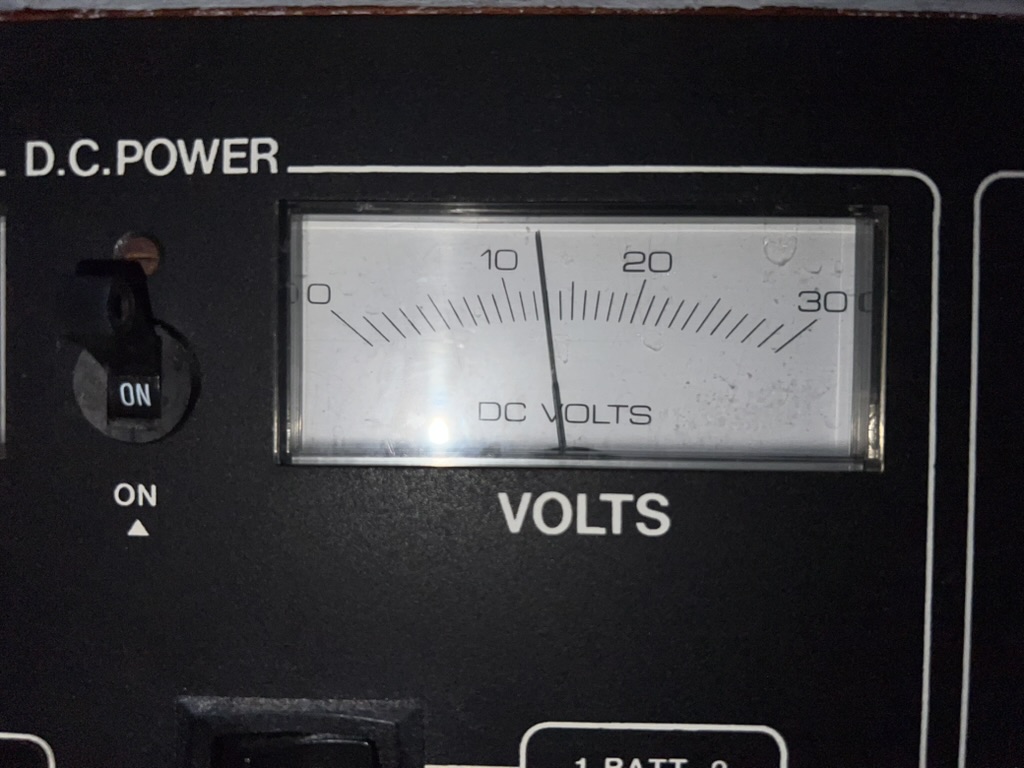
Daily we would visit the boat, put the engine on and sit there for at least an hour to charge the batteries back up to 14 Volts. But this was getting tedious and we needed a way to remotely monitor the state of the battery. This is where the idea of ESPHome and home assistant came in.
With home assistant running with Starlink providing the communication link. We created a simple ESPHome device to read the battery voltage. Unfortunately the data recorded from that device is now long gone at the time of writing this post. Needless to say, it was showing that the voltage was dropping too low.
On the 22nd November installed new batteries, thinking that the old ones that were in the boat, when we bought it, were knackered. We replaced them with new flooded lead acid batteries hoping this will solve the problem, but it’s not that easy.
In order to generate power, the engine has three alternators. One for the starter battery/bow truster battery via split charger, one for a travel power system (which doesn’t work) and another for the leisure batteries. The leisure batteries can also be charged from the Inverter/charger which is connected to the shoreline connector. The next step was to get solar generation installed. Click here to read about the solar installation
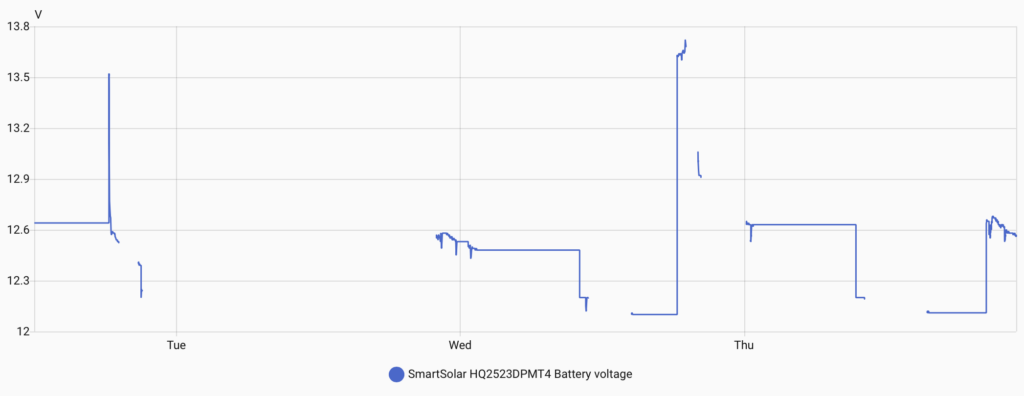
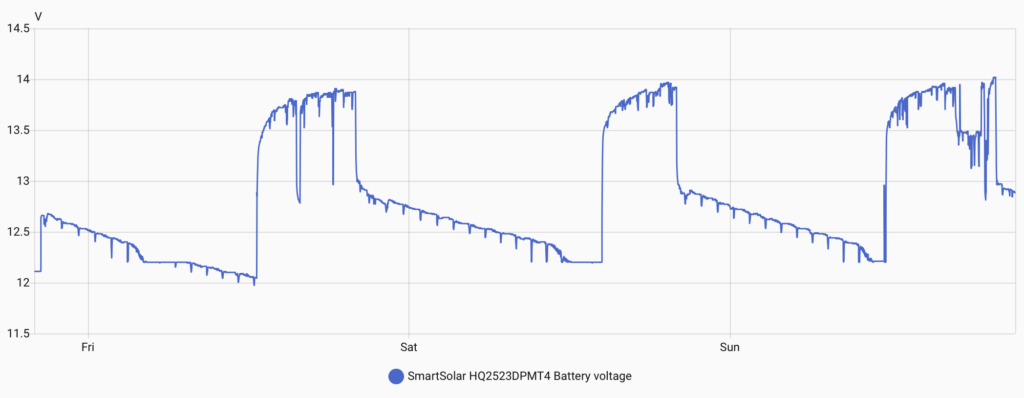
With the solar installed the controller can read the battery voltage, battery current, solar power and daily yield. This can send this data to home assistant via Bluetooth. This gives us a much more permanent, stable and reliable battery voltage measurement …. once we had got over the Raspberry Pi Bluetooth issues and implemented the ESPHome Bluetooth Proxy.
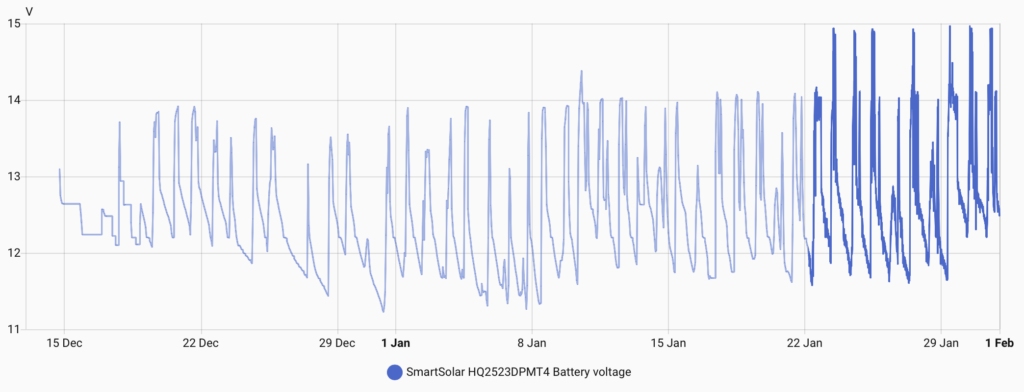
Now as you can probably recognise, those voltages don’t look great. Ideally, we don’t to dip below 12 Volts.
This is when we suspected that monitoring the voltage is only half the story. The batteries can get up to 14 Volts, but this doesn’t mean they are fully charged. Therefore, we needed a method of monitoring the current flow into the batteries. Which lead us onto installing a Victron Smart Shunt.
Smart Shunt
With this installed we can now see the current flowing in and out of the batteries and sure enough, we could see that they would get to 14 Volts but current would still be flowing into them, indicating that they were not fully charged. It did also showed us that the current went very low, down to 5 Amps, and stayed here until we switched the engine off at 8PM. We also found that on day when the solar kicked in, the solar controller would charge the batteries at 14.7 Volts. When this happened, the current would increase to more than 10 Amps. After reading more into it, flooded lead acid batteries should be charged up to 14.8 Volts, and we found that the regulator on the alternator was fixed at 14 Volts. So the batteries weren’t able to get higher than 14 Volts from the engine alone. This resulted in investing in another piece of Victron tech, the Orion XS DC to DC charger.
Orion XS
The DC to DC charger is effectively a buck/boost converter. It will take the input power from the alternator and then ensure the voltage output is maintained by limiting the current on the output. This ensured that the lead acid batteries were being charged at the correct voltage of 14.8 Volts. We did however have to sacrifice one of the leisure batteries as the Orion cannot be only connected to the alternator, it needs a battery to smooth out the alternators output voltage and allow the input stage of the Orion to discharge into the battery once the engine is switched off.
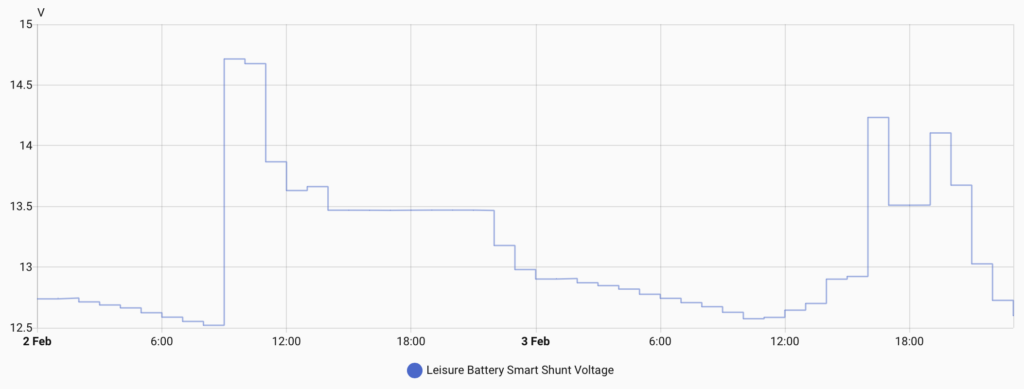
The graph above shows the battery being charged up to 14.7 Volts (default settings) and then it drops down to 13.47 Volts for the absorption stage of charging.
We trialled this for a few days and found that the batteries appeared to be charging up properly but we were not seeing much improvement on the capacity.
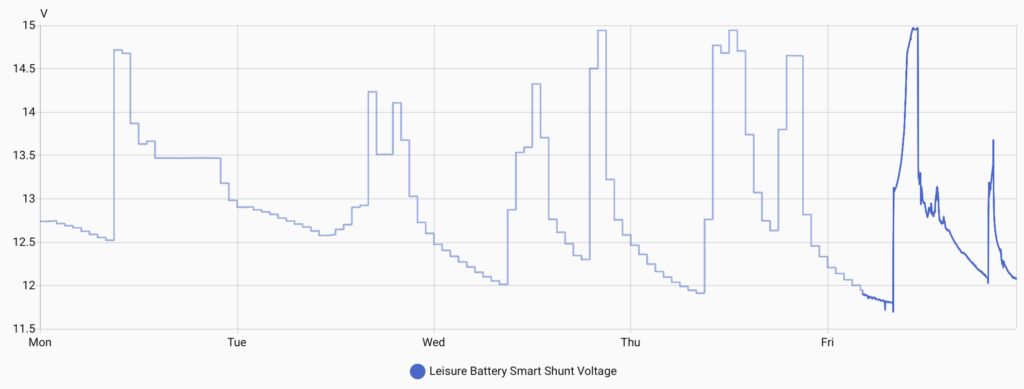
You can see that by the morning we were still dropping down to below 12 Volts. We were also getting pretty frustrated with having to babysit the boat whilst it was charging the batteries especially when the current was in the single figures.
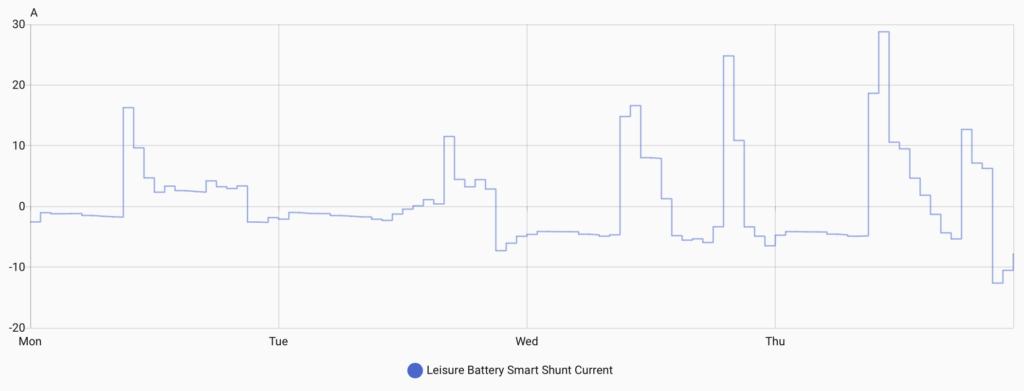
We quickly came to the decision that we were wasting our time with flooded lead acid batteries and that we needed to upgrade to Lithium.
Lithium Batteries
We had already been evaluating the market of Lithium batteries to figure out the best size in terms of physical size and capacity. We have a limited space envelope in the engine bay to locate the batteries and so it made sense to try and effectively use all of that space. Fogstar do a range of batteries called Drift. We could either opt for a few of the 300 AmpHour batteries or one 628 AmpHour battery. The price difference between these batteries showed that it would be more cost effective per KiloWatt to go for the 628 AmpHour battery of £1,099.99, but it would mean that we would only be able to fit one of them in the engine bay. The 300 AmpHour batteries cost £699.99 but technically, we should be able to fit four of them in the engine bay resulting in a maximum capacity of 1200 AmpHours. We went for two 300Ah batteries.
Lithium batteries have a much lower resistance, which means the charing current can be much higher than lead acid batteries. Since we will be charging these batteries off the alternator, we need to be able to control the current carefully to make sure we aren’t over charging the batteries and that we aren’t pulling too much current from the alternator. Apparently this is a bigger issue when the engine is just in tick over as the alternator has a fan built in and the speed of the fan is not high enough to keep it cool. Luckily, we had already fitted the Orion XS, so we can carefully control the current. I think I’ll add some temperature sensors to the engine at some point, so the alternator can have it’s own one and we may be able to dial back the current if it is getting too hot. Future project.
As we said before, we needed one lead acid battery to act as a buffer for the Orion XS. We are thinking of replacing this for a smaller lead acid battery in the future if we need the physical space for more Lithium batteries.
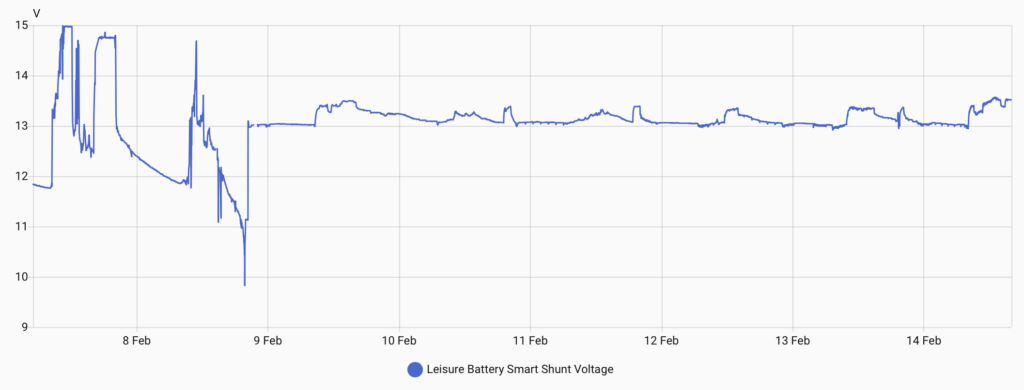
This graph shows the difference in the voltage between the battery technology. On the 7th of February, we were running on the flooded lead acid batteries. On the 8th, we installed the Lithium batteries. During the installation, we left one of the leisure batteries still attached to allow some power for lights and things. That dip, where the voltage goes down to less than 10 Volts was when we were running the circular saw to create the base for the new batteries to be mounted to. Since the installation day, you can see that the voltage on the batteries are much more stable and above 13 Volts.
The boat feels very different since installing Lithium batteries. The water pump is more responsive, the lights in the bathroom no longer dip when we flush the toilet, we can run the Webasto heater, and we can even switch the fridge freezer on!
These new Fogstar batteries even have bluetooth which was very easy to setup on their app and they have a add-on for Home Assistant, so we are now able to see lots of lovely data from each of the batteries, including the all important State of Charge (SoC) and the running time remaining.
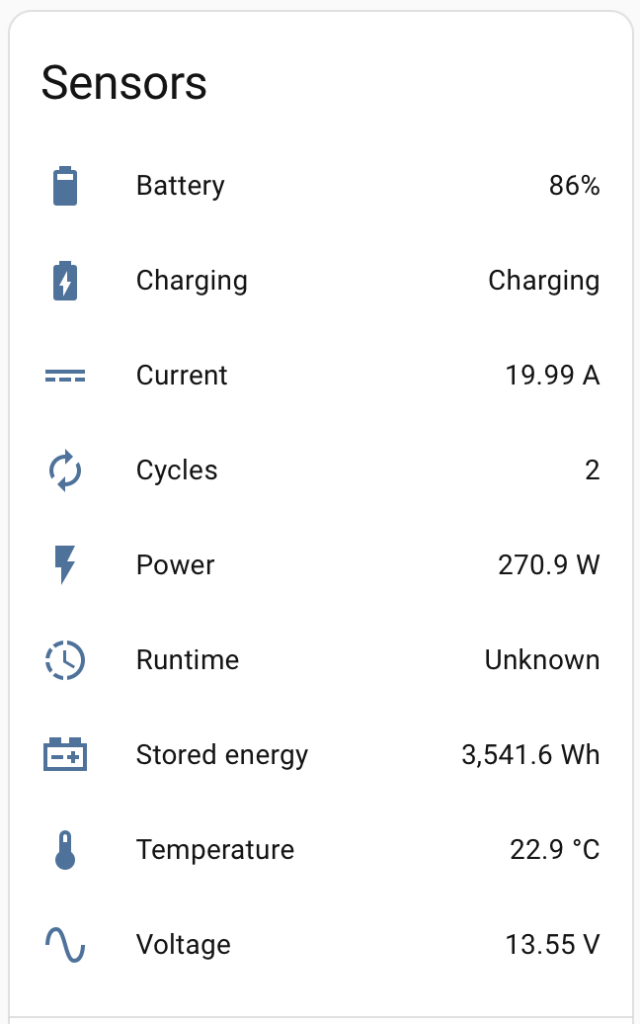
The runtime in that image is showing unknown as it is currently charging.